Notebook Studio: DataMentor Open Live App

Integrated Technical + Scientific Documentation

DataMentor: A Reproducible Framework for Serverless CSV Intelligence and Notebook Automation

Upload any CSV and get 10 interactive visualizations with column selectors, domain-aware analysis, in-browser Python notebooks with matplotlib, AI runtime repair, and cloud persistence — all serverless.
10 Universal Charts Domain-Aware Analysis In-Browser Python matplotlib Inline AI Runtime Repair Claude Skill

0

Universal chart types with dynamic column selectors

0

Guided Python notebook cells with inline matplotlib

0

Serverless — everything runs in your browser

Platform Features

Everything you need to analyze any CSV dataset — from upload to publication-quality visualizations.

10

Universal Visualizations

DistPlot, Pie, Violin, HeatMap, PairPlot, JointPlot, Bar, Histogram, Scatter, Line — each with dynamic column selectors that adapt to your data.

AI

Domain-Aware Analysis

Knowledge-base engine generates contextual insights based on recognized column names — medical, financial, or scientific. Updates in real-time as you change selections.

Py

In-Browser Python

14 guided Pyodide cells including 6 matplotlib visualizations rendered inline as base64 images. Full pandas, numpy, matplotlib, and scipy — no server required.

FIX

AI Runtime Repair

Rule-based error detection with model-assisted fallback. Automatically identifies notebook execution failures and suggests one-click fixes.

DB

Cloud Persistence

Firebase Google auth with Firestore cloud storage. Save, load, and delete your analysis workspaces. Offline localStorage fallback included.

CSV

Deterministic Cleaning

Automated pipeline: header normalization, whitespace trimming, duplicate removal, missing value handling — fully transparent and reproducible.

All 10 Visualization Types

Every chart type includes dropdown column selectors in both STANDARD and CUSTOM modes.

DistPlot
Pie Chart
Violin Plot
HeatMap
PairPlot
JointPlot
Bar Chart
Histogram
Scatter Plot
Line Chart

Scientific Basis and Research Objective

Problem framing, hypotheses, and measurable research goals.

Research Problem

Raw CSV workflows are often non-reproducible, labor-intensive, and error-prone due to inconsistent schemas, duplicate rows, missing values, and fragmented multi-tool processing.

Core Hypothesis

A guided automation-first architecture with browser-native execution and deterministic repair logic can reduce preprocessing burden while improving repeatability and debugging reliability.

Primary Objectives

  • Build deterministic CSV cleaning + notebook generation pipeline.
  • Evaluate productivity gain versus manual baseline workflows.
  • Assess error recovery behavior under hybrid rule/model repair strategy.

Applied Domains

  • Academic labs and reproducible coursework analytics.
  • SME operations teams without dedicated data engineering staff.
  • Analyst pipelines for anomaly/fraud readiness screening.

Step-by-Step Development (Easy + Technical)

Select each stage to inspect engineering decisions and outcomes.

Step 1: Problem Discovery

Mapped common CSV pain points from real educational and operational data workflows.

  • Goal: Define repeatable target workflow from upload to validated analytics output.
  • Built: Requirements matrix and failure-mode taxonomy.
  • Result: Architecture blueprint for reproducible, user-friendly automation.

Interactive System Architecture

Click each module to inspect inputs, outputs, and resilience strategy.

Architecture Node Details

Select a module from the left to view technical details.

  • Inputs: -
  • Outputs: -
  • Reliability Strategy: -

Data Flow: Ingestion → Cleaning → Notebook → Runtime → Visualization → Domain Analysis, with Auth + Storage + AI reliability spanning all stages.

Experimental Evaluation and Impact

Observed efficiency, quality, and scalability behavior under baseline comparison.

Efficiency Gain

Automated cleaning reduced repetitive data preparation time across workflow stages.

Quality Improvement

Consistency and traceability metrics improved after deterministic transformation rules.

Runtime Reliability

Hybrid repair loop reduced interruption time for common notebook execution failures.

Interactive Chart Profile

Processing Time Trend

Manual vs Automated Stage Time

Data Quality Radar

Scalability Profile

Cumulative Workflow Savings

Error Recovery Distribution

Claude Skill — Build DataMentor Yourself

Follow this complete guide to build your own DataMentor web app from scratch. No prior experience required — just Claude and the skill file.

OPEN-SOURCE BLUEPRINT

Build a Production-Grade CSV Analytics Platform

One skill file. One AI assistant. Zero boilerplate. Get a complete web app with 10 chart types, in-browser Python, AI error repair, and cloud persistence.

11 Build Steps
450+ Lines of Instructions
10 Chart Types
14 Notebook Cells

What is a Claude Skill?

A Claude Skill is a structured markdown file (.md) that acts as a detailed instruction manual for Claude AI. When you provide this file to Claude Code, Claude Desktop, or any Claude-powered tool, the AI reads the entire blueprint and builds the application step by step — writing every file, component, and configuration for you automatically.

Think of it as a recipe: the skill file is the recipe, Claude is the chef, and the result is a fully working web application.

What You Will Build

By following this guide, you will have a fully working DataMentor web app with all these features:

Smart CSV Upload

Drag-and-drop file upload with automatic parsing, column detection, and type classification (numeric, categorical, boolean, datetime).

Data Cleaning Pipeline

Automated header normalization, whitespace trimming, duplicate row removal, and missing value handling — all deterministic and reproducible.

10 Interactive Charts

DistPlot, Pie, Violin, HeatMap, PairPlot, JointPlot, Bar, Histogram, Scatter, and Line — each with dropdown column selectors.

Domain-Aware Analysis

Knowledge-base engine that recognizes medical, financial, and scientific columns and generates contextual insights automatically.

In-Browser Python Notebook

14 guided Pyodide cells with pandas, numpy, matplotlib, and scipy — including 6 inline chart renderings. No server needed.

AI Runtime Repair

When notebook code fails, the AI assistant automatically detects the error type and suggests one-click fixes using rule-based and model-assisted strategies.

Firebase Cloud Persistence

Google sign-in authentication with Firestore storage. Save, load, and delete your analysis workspaces across sessions.

GitHub Pages Portal

A complete documentation website with interactive charts, architecture explorer, video embed, and collaboration tools.

Prerequisites — What You Need Before Starting

Make sure you have these tools installed on your computer. All are free.

1

Node.js (v18 or later)

JavaScript runtime for running Next.js. Download from nodejs.org and verify with node --version in your terminal.

2

Claude Code or Claude Desktop

Install Claude Code CLI (npm install -g @anthropic-ai/claude-code) or use Claude Desktop app. You need an Anthropic API key or Claude subscription.

3

Git (Optional)

Version control for managing your code. Download from git-scm.com. Helpful but not strictly required.

4

Firebase Account (Free Tier)

For authentication and cloud storage. Create a project at console.firebase.google.com. Enable Google sign-in and Firestore database.

Step-by-Step: How to Build DataMentor

Click each step below to see exactly what to do. Follow them in order for the best results.

Step 1 of 6
STEP 1

Download the Skill File

The skill file datamentor-skill.md is the complete blueprint. It contains every instruction Claude needs to build the entire application.

A
Option A — Download from this page

Click the green "Download Skill File" button at the bottom of this section. You will be asked to star the GitHub profile first (takes 5 seconds).

B
Option B — Clone from GitHub

Run this command in your terminal to get the file directly:

git clone https://github.com/ANIS151993/Notebook-Studio.git
cd Notebook-Studio
ls datamentor-skill.md
Tip: Save the file somewhere easy to find, like your Desktop or Documents folder. You will reference this file in Step 3.
CLAUDE SKILL FILE

datamentor-skill.md

Complete blueprint covering 11 build steps, all components, architecture patterns, and implementation details. Works with Claude Code, Claude Desktop, or any Claude-powered tool.

Next.js 16 React 19 TypeScript Chart.js Pyodide Firebase Claude Skill

Free and open-source. Star the project to unlock.

Frequently Asked Questions

Do I need to know how to code?

No. Claude writes all the code for you. You just provide the skill file and follow the prompts. Basic familiarity with using a terminal (typing commands) is helpful but not required — Claude Desktop has a visual interface.

How long does it take to build?

Claude typically builds the full application in 15–30 minutes depending on your internet speed and the tool you use. You can build individual parts separately if you prefer.

Is this free?

The skill file is free and open-source. You need a Claude subscription or Anthropic API key to use Claude Code or Claude Desktop. Node.js and Firebase free tier are also free.

Can I customize the app after building it?

Absolutely. The skill file produces standard Next.js + React code. You can modify the domain knowledge base, add new chart types, change the UI theme, add new features, or adjust anything to your needs — either manually or by asking Claude to make changes.

What is the difference between Claude Code and Claude Desktop?

Claude Code is a terminal-based CLI tool — you type commands and Claude writes code directly in your project folder. Claude Desktop is a visual app with a chat interface where you can drag-and-drop files. Both work with this skill file. Claude Code is faster for developers; Claude Desktop is easier for beginners.

Can I use a different AI model instead of Claude?

The skill file is optimized for Claude but the instructions are detailed enough that other AI coding assistants (like GitHub Copilot, Cursor, or ChatGPT) can also follow them. Results may vary — Claude produces the most accurate output because the file uses Claude's skill format.

DataMentor Video Overview

Watch a guided walkthrough of the platform flow, technical design, and practical results.

Project Walkthrough Video

Single click starts playback instantly in this section. No new tab is required.

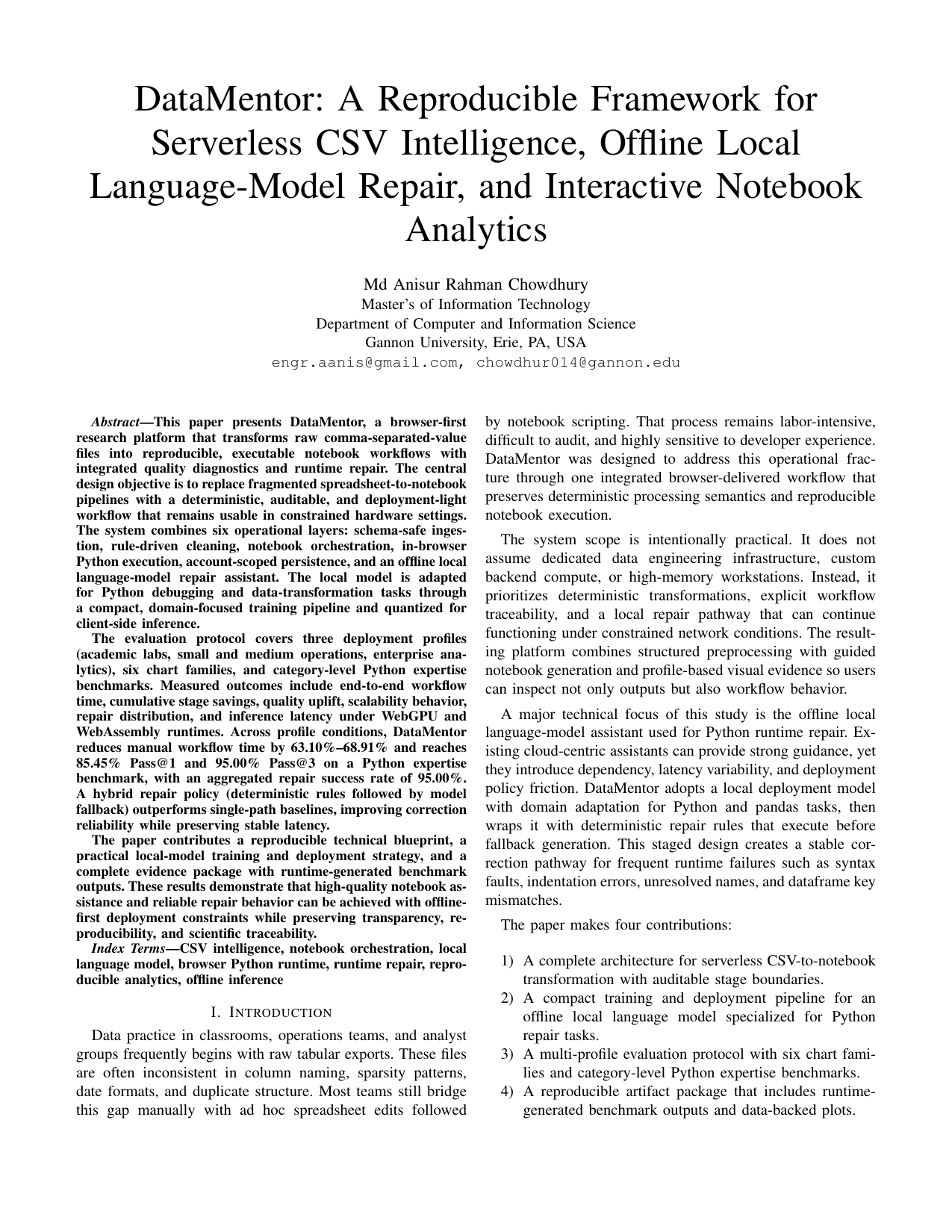
Protected Manuscript

Public first-page preview only

The site intentionally exposes only the first-page manuscript preview and abstract summary. The full conference PDF and source package are available only as encrypted downloads through the policy gate.

Professional Profiles and Collaboration

Complete profile links and technical collaboration request entry point.

Start a Technical Collaboration Request

Choose your required service area and send a structured request in one click.

Selected service

Data Workflow Automation